

THE PULSE SURVEY
After sessions 6, 9, and 12, the platform will ask you to launch the Pulse survey. This is a check-in survey for the leader and their coworkers, to review their progress over the last period.
Once session 6/9/12 has been marked complete, both the coach and the leader will receive a notification email that the Pulse is ready to be launched:
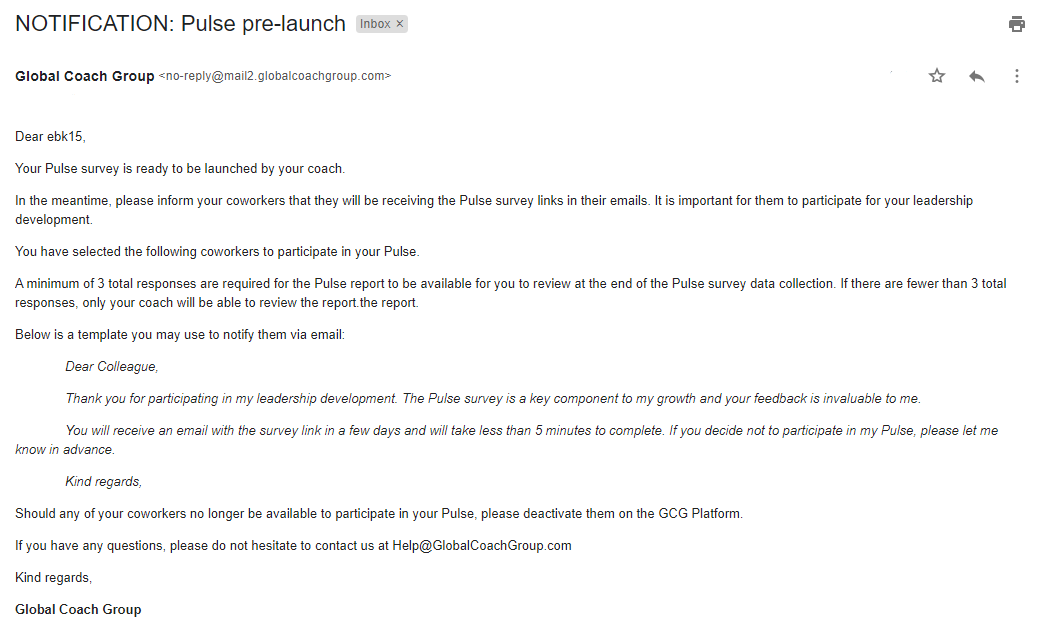
After the leader notifies their coworkers, the coach can go ahead and manually launch the pulse in the platform. This will trigger emails to go out to the leader and their coworkers, with links to the Pulse survey.
My leader has difficulties scheduling session 7 even if I am available. Why is that?
Please note that the minimum required time to book sessions 7, 10, and 13 is 15 business days to allow Pulse to launch and run. This will give enough time to the coworkers and the leader to fill out the survey.
What if one of the coworkers refuses to participate in the Pulse survey?
Should any coworker decide not to participate or if a coworker is unavailable, the leader has the option to 'deactivate' this coworker directly on the coaching platform up until the coach launches the pulse. Once the survey has been launched, the coworker is not given the option to opt out.
Will the coworkers be requested to provide feedforward during the pulse?
As part of the Pulse survey questionnaire, coworkers will be asked to provide feedback and feedforward suggestions for their colleague. Therefore, the monthly feedforward process is halted during that month.
How many survey reminders will be sent?
The coach can set three reminder dates for the survey, which will be sent out to any coworkers who have NOT completed the survey by that date.
Is there a minimum of responses required for the survey?
To ensure the anonymity of responses, if there are fewer than 3 total responses collected in any given breakout group, the leader's view of the Pulse report will not be complete. The responses from the Coworkers breakout group will be hidden. You as the coach, however, will be able to view the entire report.
Will I be able to access the final Pulse report?
After you manually close the Pulse, the coaching platform will send you and the leader an email that the data collection has concluded. The Pulse report will be available to be viewed on the coaching platform. The leader will have access to the Pulse report on their account after the debrief session (session 7, 10, 13)
Please note that the Pulse process is explained in detail on the eLearning, under Sessions 5, 6, and 8 - GROW -> SESSION 6 - INTRODUCE PULSE SURVEY -> Pulse Survey - Benefits & Process.
Will I be able to download a PDF version of the Pulse report?
The report can be downloaded by clicking on the Download PDF button at the bottom of the page.
Why can’t the leader access the Pulse survey report before the debrief session?
The coach needs to have the report and prepare for the debrief before sessions 7, 10, and 13. However, the leader should have visibility into the Pulse report after the debrief, as the leader may arrive at different conclusions without the coach’s guidance. It’s the overall guidance provided by the coach that is very relevant in sessions 7, 10, and 13. Accordingly, the report will be visible to the leader after the debrief has taken place.