

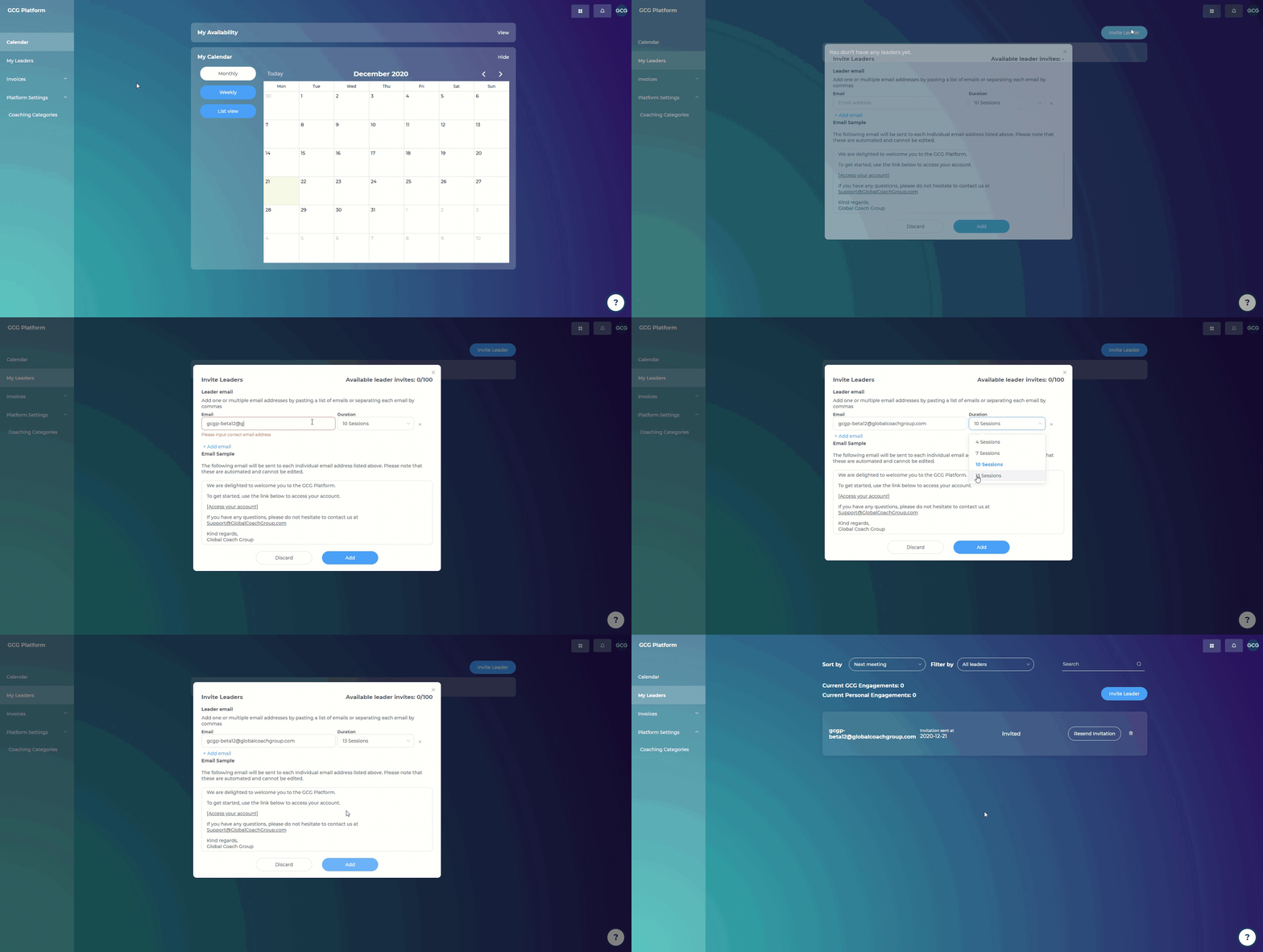
Steps:
Go to "My Leaders"
Click "Invite Leader" in the top right-hand corner
Add in your leader's email
Choose the duration of the engagement (4 sessions, 7 sessions, 10 sessions, 13 sessions)
Your leader will receive an invitation link to the platform, where they will set up a password and a time zone
When they go into "My Coach," they will see you and your profile, and be prompted to schedule Session 1
Until your leader successfully registers, you can resend the invitation link (or delete the invitation) at any time
These engagements are 100% yours to manage, and GCG is not involved in any financial arrangements related to your personal engagements.
Please note: This feature to invite your own leaders will be free until May 31st, 2021*, after which point there will be a monthly subscription fee to use the platform with your personal clients.
*Update: The free trial of personal engagements has been extended, and will be free until June 11th, 2021. To subscribe to a plan before the cut-off date, please visit: https://globalcoachgroup.com/coaching-certification-fees/all-in-one-coaching-toolkit/